

The wiki is your shop's internal handbook: check-in steps, repair guides, pricing rules, opening and closing routines. New staff learn faster, and everyone does things the same way.
Create a document
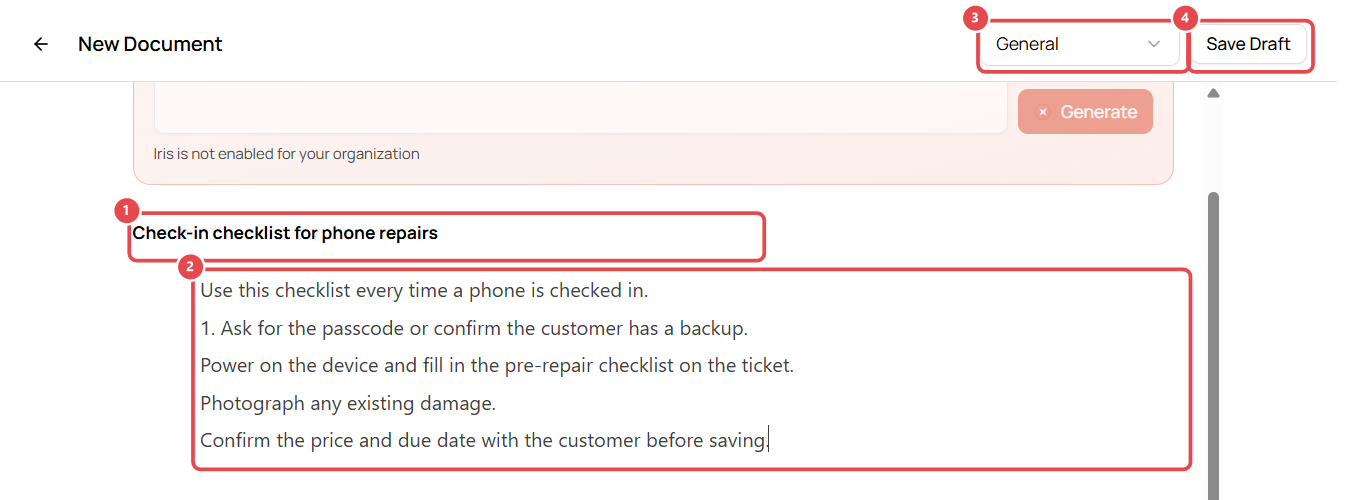
- Go to Wiki and click New Document.
- Type the Title ①, e.g. Check-in checklist for phone repairs.
- Write the content in the editor ②. Type / for headings, lists, tables and more.
- Choose the folder ③ (e.g. General).
- Click Save Draft ④ to save without showing it to the team yet.
Tip: if the editor already contains "Document Title" and "Start writing…", select that text and delete it before you start typing.
Publish and update
After the first save, the toolbar shows:
- Version History ①: see earlier versions and restore one.
- Preview ②: see the document as your team will.
- Publish ③: make it visible to everyone with access.

Control who can see a document
Under Access Control, documents inherit their folder's access by default. Change it to limit a document to certain roles, e.g. pricing rules for managers only.
Iris AI (if enabled)
With Iris AI turned on for your account, you can describe a document and Iris drafts it (Create with Iris), and staff can ask questions in Ask the Wiki.