

Let staff request time off in Get Repair instead of by text message. Approved leave is taken from their yearly balance.
1. Create leave types
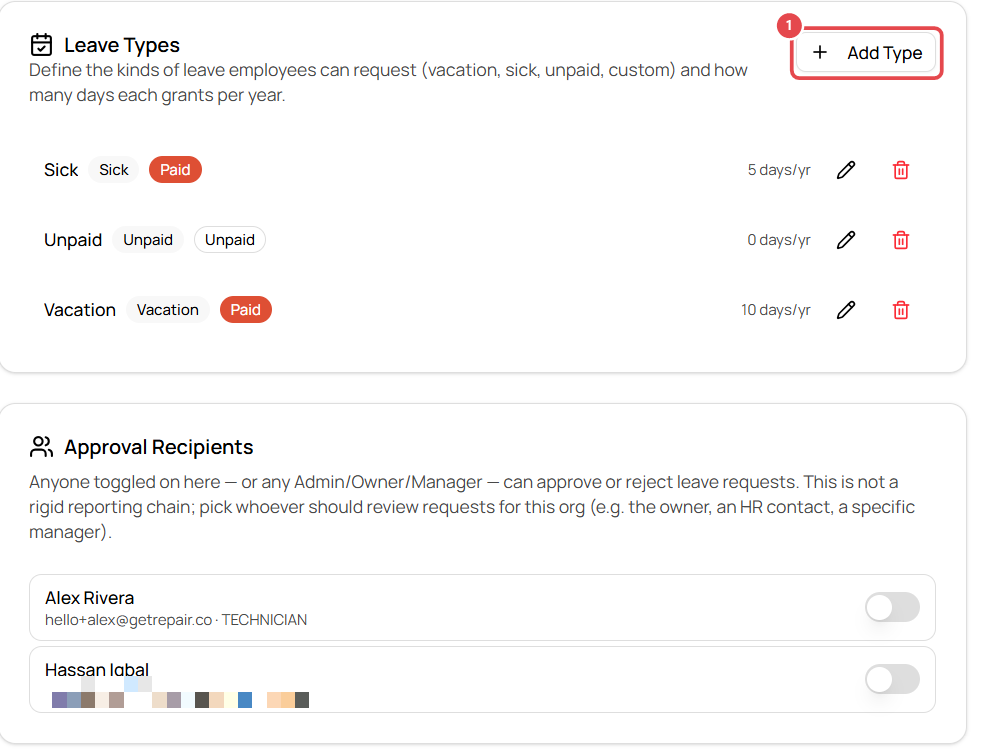
- Go to Settings → Team → Leave and click Add Type.
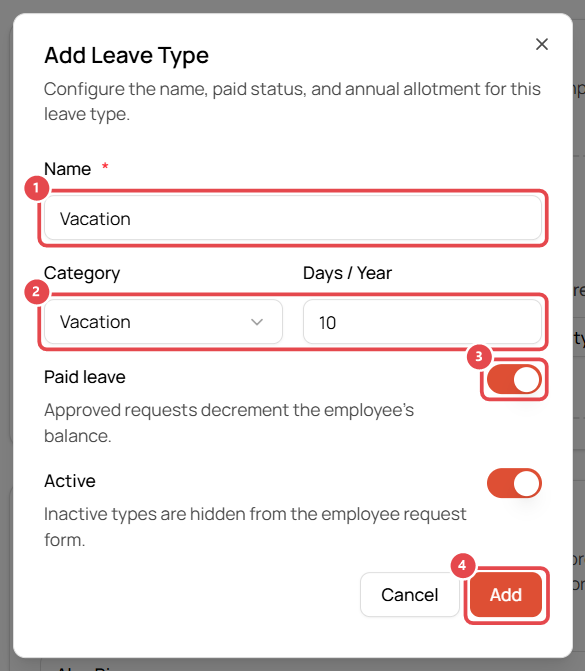
- Enter a Name ①, e.g. Vacation.
- Choose the Category and Days / Year ②: Vacation, Sick, Unpaid or Custom, and the yearly allowance (e.g. 10).
- Leave Paid leave ③ on for paid time off (approved requests reduce the employee's balance). Turn it off for unpaid leave.
- Keep Active on so staff can choose it, then click Add ④.
A typical setup: Vacation (paid, 10 days), Sick (paid, 5 days), Unpaid (0 days).
2. Choose who approves
On the same page:
- Approval Recipients: toggle on the people who should review requests. Owners, admins and managers can always approve.
- Also Notify (email only): extra email addresses that get a copy of every new request but can't approve.
3. Approve or reject requests
When an employee requests time off, it appears in Leave Requests under Pending. Open it to approve or reject. Use All to see past requests.