

Security checks let staff keep working without full permissions. For risky actions, Get Repair asks for a PIN first:
- Employee PIN: the person enters their own PIN, so you know exactly who did it.
- Admin PIN: a manager or admin must enter their PIN to approve.
Owners and admins are never prompted.
Steps
- Go to Settings → Team → Security Checks.
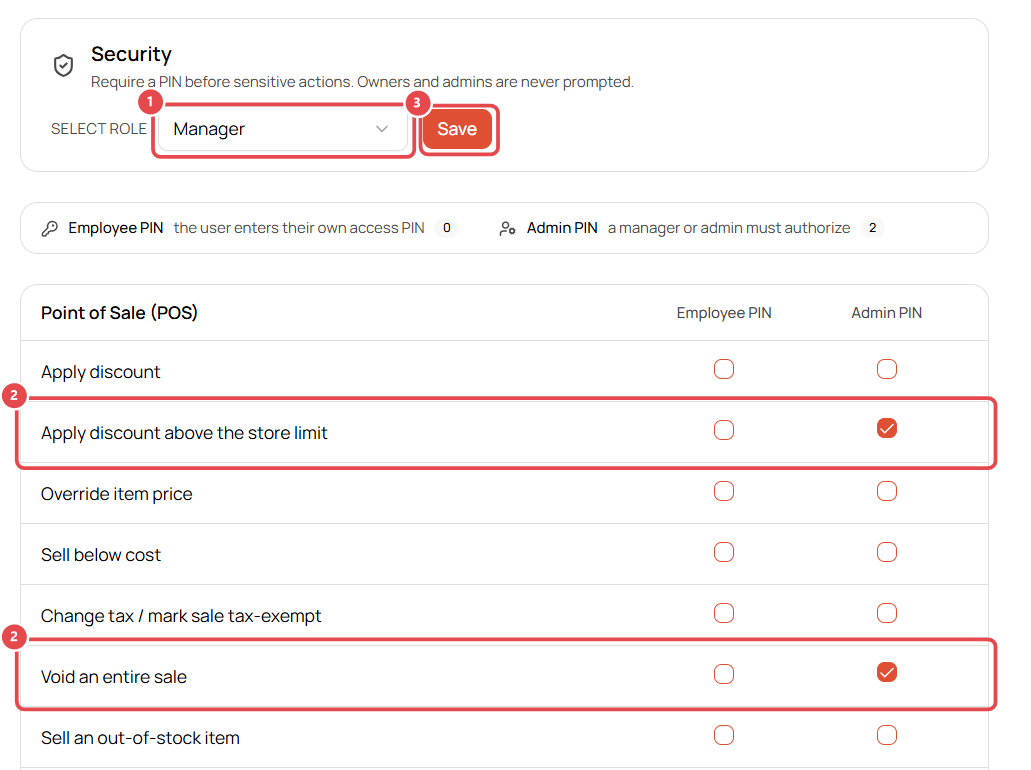
- Select role ①: choose the role you're setting up, e.g. Manager or Front Desk.
- For each action, tick Employee PIN or Admin PIN ②. For example:
- Apply discount above the store limit: Admin PIN
- Void an entire sale: Admin PIN
- Click Save ③ (it appears once you make a change).
Actions you can protect
| Area | Examples |
|---|---|
| Point of Sale | Apply discount, discount above store limit, override price, sell below cost, change tax / tax-exempt, void a sale, sell out-of-stock, backdate a sale, open cash drawer |
| Invoices | Edit after payment, delete, give refund, refund to cash, refund past return window, waive restocking fee, exchanges, import/export |
| Inventory | Delete item, edit cost price, adjust stock, create transfer, import/export |
| Repair Tickets | Delete, reopen or edit a completed ticket, edit labor price, discount, edit warranty, import/export |
| Estimates | Create, edit, delete, discount, approve/decline on the customer's behalf, export |
| Customers | Delete or merge, store credit, set tax-exempt, import/export |
| Purchase Orders | Delete, approve, edit unit cost, edit received PO, cancel, export |
| Cash Register | Start/end shift, cash in/out, open drawer without a sale, edit counted cash |
| Settings | Access settings, manage employees, roles, PINs, tax, integrations, delete from trash |
Good to know
- Each employee sets their own 4-digit PIN in Profile → Access PIN.
- The counters at the top show how many actions currently use each PIN type for the selected role.