

Don't do trade-ins? Not tracking expenses yet? Hide those modules so your team only sees what they use. Turning a module off hides it from the sidebar without deleting any data, and you can turn it back on any time.
Steps
- Go to Settings → Advanced → Modules.
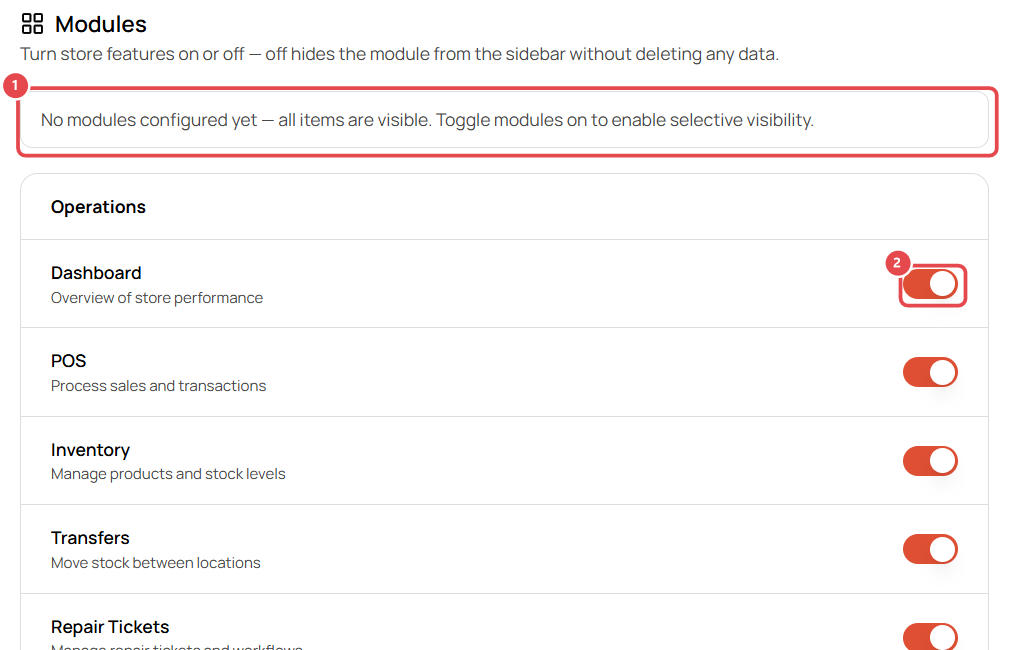
- Until you change something, every module is visible ①.
- Use the switch next to a module ② to turn it on or off.
Modules you can turn off
| Group | Modules |
|---|---|
| Operations | Dashboard, POS, Inventory, Transfers, Repair Tickets, Estimates, Leads, Trade-In, RMA |
| Finance | Invoices, Purchase Orders, Expenses, Reports |
| Management | Customers, Inbox, Wiki, Tasks, Schedule, Leave Requests |
Modules are set per store, so a retail-only location can hide Repair Tickets while your repair shop keeps it.