

Writing procedures takes time. With Iris you describe what you need and get a structured first draft in seconds, then edit it to match how your shop works.
Draft a document with Iris
- Go to Wiki and click New Document.
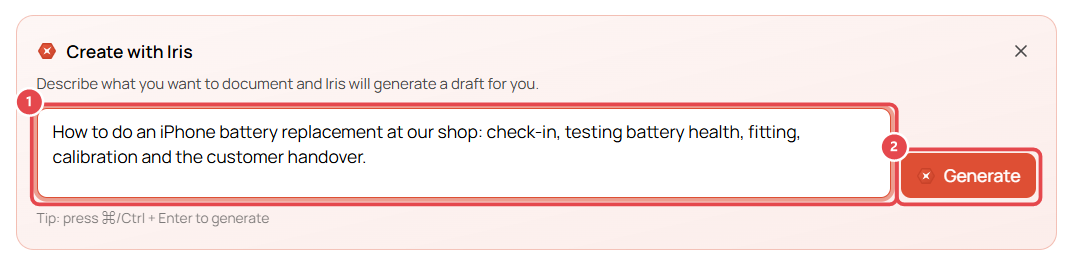
- In Create with Iris, describe the document ①, e.g. "How to do an iPhone battery replacement at our shop: check-in, testing battery health, fitting, calibration and the customer handover."
- Click Generate ② (or press Ctrl/⌘ + Enter).
- Iris writes the draft in the editor with headings and steps.
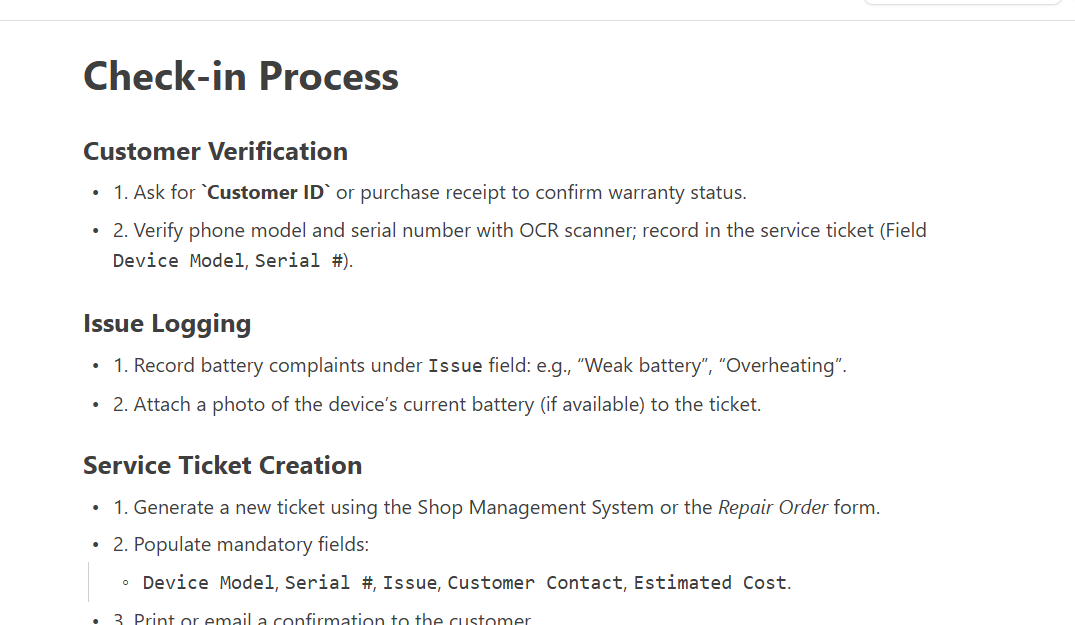
- Edit the draft so it matches your shop. Replace generic wording with your actual screens and rules, and fix any formatting.
- Type a Title. Iris doesn't add one.
- Click Save Draft, then Publish when it's ready (see Write your shop's procedures in the wiki).
Ask the Wiki
On the Wiki home page, type a question in Ask the Wiki, e.g. "How do I log a battery complaint on a ticket?", and press Enter. Iris answers from your published documents.
If Iris replies "I couldn't find that in the wiki" for something you know is documented, use Search wiki at the top instead and let us know at hello@getrepair.co.