

The job timer on each ticket records how long technicians spend on the repair.
Use the timer
- Open the ticket and find the Job Timer panel.
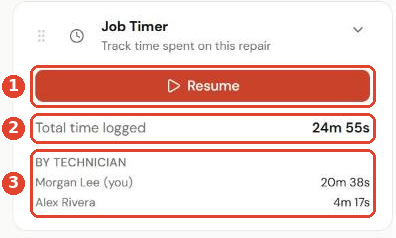
- Click Start (or Resume ①) when you begin work, and pause it when you stop.
- Total time logged ② adds up every session on the ticket.
- By technician ③ shows how much time each person logged.
See logged time in reports
Go to Reports and open the logged-time report.
- Logged time by technician ① totals time and ticket count per person.
- Logged time by ticket ② shows each ticket's status and total time.
